Hello, this is Ajani, and today we are talking about some of the best Photoshop Apps (in my opinion).
1:PicsArt.
PicsArt is a popular all-in-one image editing app and creative community that makes it easy to take your photos to the next level. With thousands of powerful editing features, you can remix amazing pictures, collages and drawings, and photos with friends.
Millions of people use Pixart as it packs a selection of premium tools such as photo blending, artistic filters, AI-powered photo effects, Photoshop-style layering and drawing tools, cropping, text overlays, and more. Discover thousands of free sticker packs, fonts, collage templates, backgrounds, and brushes. Find the images you like and learn how to make them with daily photo editing challenges and tutorials. Remix millions of free-to-edit images with a global community of over 100 million monthly active users, and chat, share and edit photos with your friends using Remix Chat.
Just like you’d expect, this free photo editing app comes with a range of preset filters. However, unlike most apps, you can edit these filters and even create your own from scratch.
It also has all of the classic tools, such as cropping, straightening, frames, text, vignettes, etc. And the sharpening feature does the job without making the image look grainy.
Then, things get interesting.
Snapseed has precision masking, which allows you to edit the depth of field – photographers often do this to make the background blurry and bring the foreground even more into focus.
There’s also a “Selective Adjust” tool. This lets you select a specific area of your photo and adjust the saturation, contrast, and brightness of that single point.
What’s more, the photo editor app saves your edit history, so you can amend your previous edits at any point.
For Android and Iso
3: Adobe Photoshop Express
Adobe Photoshop Express takes many of Photoshop’s most useful photo editing tools and squeezes them into a mobile app. And despite providing plenty of advanced features, this free photo editing app is easy to use on a small touchscreen.
Just upload a photo from your device, take a new one with the camera, or use an image from your Adobe Creative Cloud account, and then start editing.
It has all the tools you’d expect – cropping, red-eye correction, brightness, contrast, saturation, filters, borders, etc. However, the best part is its selection of smart filters. These filters automatically correct common issues, such as color temperature and exposure problems
Canva is a graphic design platform, used to create social media graphics, presentations, posters, documents, and other visual content. The app already includes templates for users to use. The platform is free to use and offers paid subscriptions like Canva Pro and Canva for Enterprise for additional functionality Wikipedia
Learning to code is difficult, it takes total concentration mentally and physically. You have to give up things that you enjoy doing completely in order to understand the basic fundamentals of programming. The goal is to morph into a developer and stand in your power.
Imagine That! happening to a 10 and 13 year old, being placed in a environment where they had to make sacrifices such as giving up video games, play time outside, hanging with friends. All for the sake of learning to code and be damn good at it.
The environment where we learned to code is called home-school and we are grateful our parents incorporated programming into our curriculum.
The beginner learning to code should focus on the basics fundamentals of HTML and CSS. It would help to be computer literate before taking a deep dive into learning code. There are many concepts to learn during your journey. Research, Using The Command Prompt, Learning The File Derrectere, Installing Tools, Bootstrap, Sass, CSS Grid, Flexbox, GSAP, CSS Reset, Learning these tools will add in the learning process.
Research is a must: Let’s say that there is a problem in the code that you are, writing and you can figure it out. Don’t panic! You will need to do some research on your browser what your problem is. Websites to visit when you’re problem-solving. Stackoverflow.com, W3Schools.com, Css-tricks.com, Developer.mozilla.org all these websites show you documentation that you will need to fix the problem. Next, to keep your browser running smoothly, Updates are required so your browser does not get its data to stuck and run slow so, make sure to update the browser every time it asks to be updated. If you research it will make HTML and CSS easier and help in the long run.
Command Prompt, Command prompt is a command-line interpreter application available in most Windows operating systems. It’s used to execute entered commands and can be used to locate files/folders and edit. NPM is a tool used to install the command prompt faster by using tools like Git and Sudo. Now I will talk about Git which, is software for tracking changes in any set of files, usually used for adjusting work its collaboratively developing source code during software development.
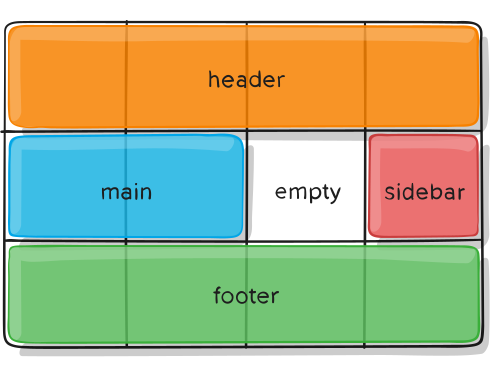
CSS Grid is a two-dimensional grid system used to work on the layout of UI elements and segments of a webpage. The Grid comprises horizontal and vertical lines to form rows and columns. Using CSS Grid to place UI elements helps to position them precisely which is beneficial for implementing responsive design for the site. The Grid uses pixels to fix the sizes of elements, and these too can be flexible on a percentage basis. This helps the same webpage adjust its design according to the screen size of different devices like phones, tablets, and desktops. CSS Grid thus plays an important role in creating web page layouts that facilitate responsiveness. It is a key tool in building cross-platform compatible software by facilitating the creation of an attractive UI.
GSAP, Simply put, GSAP is an animation framework that uses javascript to make animations to put in elements in the HTML document. There are many ways to use animations on websites like moving images and text. GSAP can also be used as a suite of tools for scripted animation. It includes The GSAP core, The core of the engine which animates any property of any object. The core makes animation easy and it takes only a few lines of code to give you more control over your animations.
Bootstrap: Bootstrap is a free and open-source front-end development framework for the creation of websites and web apps. Bootstrap is very useful because It allows you to design templates for forms, buttons, tables, navigation, modals, image carousels, etc. It also gives you support for JavaScript plugins. Bootstrap can also be used as a potent front-end framework used to create modern websites and web apps. It’s open-source and free to use yet features make it easy to use HTML and CSS templates for UI interface elements such as buttons and forms. Another great thing about Bootstrap is it’s great for quickly throwing together a prototype or internal tool, but it is not intended, for use on a production website Bootstrap’s way of doing things means fast development, but it makes zero sense for a uniquely designed website.
Sass: Sass is an extension of CSS that enables you to use things like variables, inline imports, and more. It also helps to keep things organized and allows you to create style sheets faster. Sass is compatible with all versions of CSS. Just like other programming languages, Sass allows the use of variables that can store the information you can use throughout your style sheet. For example, you can store a color value in a variable at the top of the file, and then use this variable when setting the color of your elements. This enables you to quickly change your colors without having to modify each line separately. Used with Partials the @import directive allows you to import your partial files into the current file, to build one single CSS file. Be mindful of how many imports you’re using as an HTTP request will be generated, for each one.
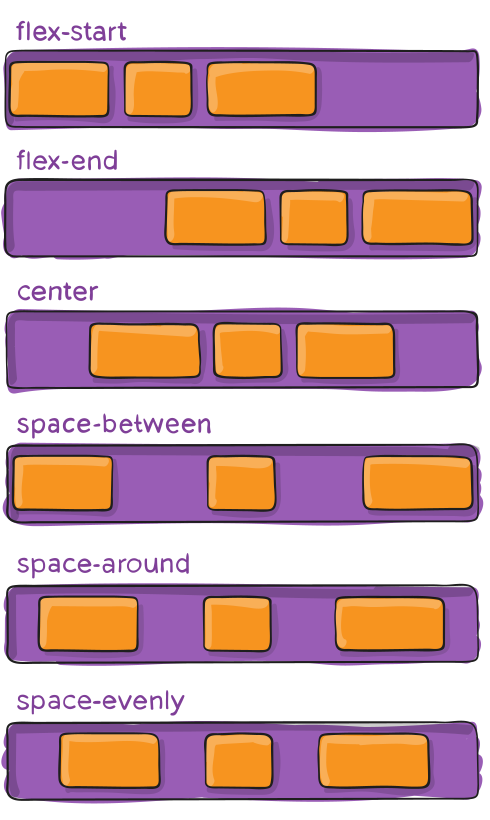
Flexbox: Flexbox is a layout model that allows elements to align and distribute space within a container. Using flexible widths and heights, elements can be aligned to fill a space or distribute space between elements, which makes it a great tool to use for responsive design. Flexbox is inherently good at dynamically sizing elements. When using display: flex; on a parent element Aka the container element like a section or div makes it so that the child elements which are a tag, p tag, and image tags orderly queue with matching heights. Matching heights vertically used can be somewhat difficult and would require more time in the CSS file. Now using flexbox handles the vertical height by default. It’s one of my favorite features of flexbox because I love orderly grids. The align-items property in flexbox defaults to stretch.
CSS Reset: CSS Reset is a short, often compressed set of CSS rules that reset the styling of all HTML elements to a consistent baseline. Every browser has its own default user agent stylesheet, that it uses to make unstyled websites appear more clear. For example, most browsers by default make links blue and click on links purple, give tables a certain amount of border and padding, apply variable font sizes to H1, H2, H3, and a certain amount of padding to almost everything. Ever wondered why do the Submit buttons look different in every browser well it’s because different browsers have different core systems that change the way each browser displays the HTML document but, you can fix this by using a CSS Reset, which can force every browser to have all its styles reset to the default, thus avoiding cross-browser differences as much as possible. Different browsers apply different default styling to elements, so if you are looking to have your website look the same in all the different browsers, a CSS reset is important. it allows you to think forwards as far as applying attributes like margin and padding to page elements in the CSS of your document.
Once you have practiced these key concepts and fundamentals and you are confident in your skills. The next step is to choose a new language to learn like Javascript, C#, C++, PHP.
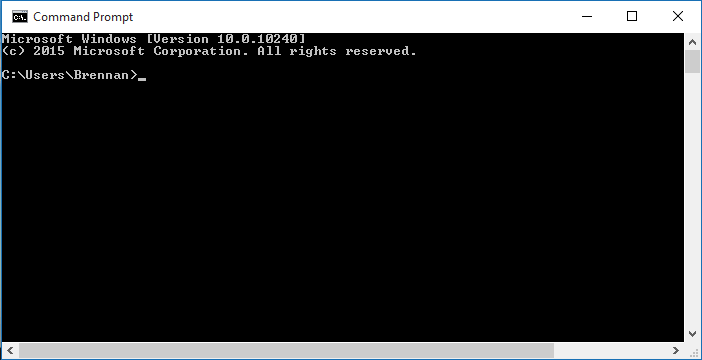
Command Prompt is a built-in software integrated into the Windows operating system to install and navigate through the file directory with basic commands. It’s used to execute entered commands. Most of those commands automate tasks via scripts and batch files, perform advanced administrative functions, and troubleshoot or solve certain kinds of Windows issues.
What is the Command Prompt?
Here’s a brief explanation of what the Command Prompt is all about: Commands written in the “Scripting” or “Command Language” consist of only one or more characters, are usually one or more lines long, and start with a space. A command starts a copy of the current file or directory, checks to see if it already exists, and if not, copies the file(s) or directory to the clipboard, the command ends the copy of the current file or directory back to the current working directory. It does not copy the clipboard copy or create a new file, directory, or folder. Commands that move the cursor within the current document (with the mouse) are called “move and screen” commands.
How to open a Command Prompt
Click on the Windows icon in the lower-left corner of the Start button. Click the Run button. Click All Programs. Click Command Prompt. Type the following to open a Command Prompt: “cmd.” –command How to delete a Command Prompt: Type “cmd.” Click the Delete icon. How to install Command Prompt: Type “Install Command Prompt.” Click the Install button. Install the downloaded file and install a basic version of the Command Prompt. How to change an option within Command Prompt: Type “cmd.” Click the Edit option. Type the following, and then hit the OK button: BIND There are many built-in commands to access core Windows functions. You can learn many of them with the Windows Command Prompt.
Tools You Need
Tools: For the tools that you will need is Git Node.JS NPM
Git is the most commonly used version control system. Git tracks the changes you make to files, so you have a record of what has been done, and you can revert to specific versions should you ever need to. Git also makes collaboration easier, allowing changes by multiple people to all to be merged into one source. What Is Git & Why Should You Use It?
Git is also used for copying and cloning your repositories (Projects) to GitHub. To install git head to their download page Git.Com install and run the program. Now you have git you can run git in git bash. More Git Commands can be found here Git-Commands.
Node.js is an open-source, cross-platform, back-end JavaScript runtime environment that runs on the V8 engine and executes JavaScript code outside a web browser, Node js is primarily used for non-blocking, event-driven servers, due to its single-threaded nature. It’s used for traditional websites and back-end API services but was designed with real-time, push-based architectures in mind Wikipedia, Why-Should-I-Use-Node.JS.
npm is the world’s largest software registry. Open-source developers from every continent use npm to share and borrow packages, organizations use npm to manage private development as well. npm consists of three distinct components: the website, the Command Line Interface (CLI), the registry About npm.
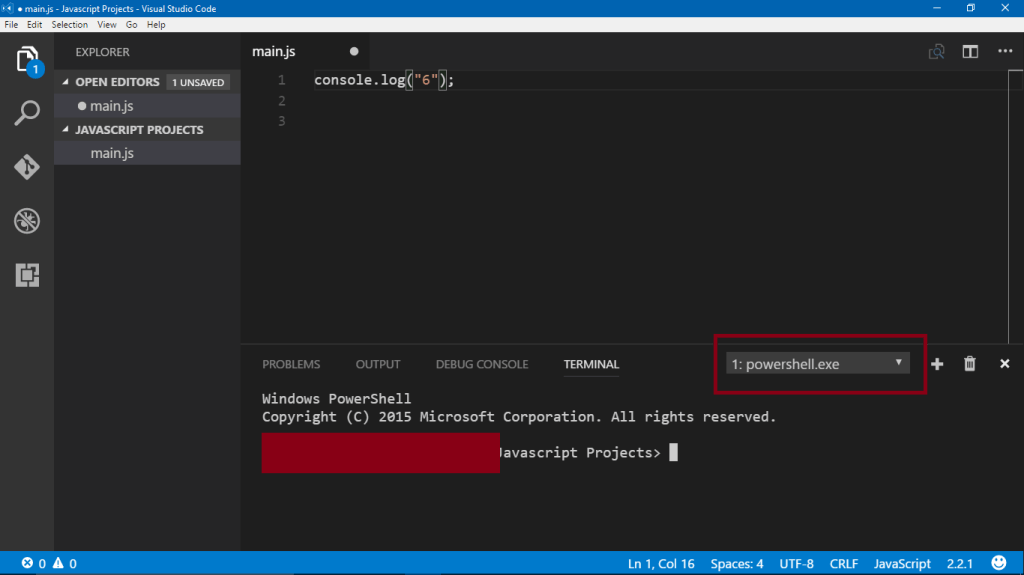
VSCode This is not a program that is installed in the Command Prompt but this application is used for coding in
14 programming languages. this also has a built-in Command Prompt used for a whole bunch of things.
Focusing on a Specific Folder
By default, the command prompt opens in the Recycle Bin folder, you can choose a different folder to browse. You can either make the directory’s location always be on the first line, or add it to the end of your command. To change the command prompt folder location, right-click in the Recycle Bin folder or navigate to the location of your choice, right-click the folder, and select Properties. Find the Recycle Bin section and scroll down until you find Command Prompt in the System category. If you want to add the command to the end of the line, find the line number of your command and add the modifier -q. -q refers to the command as a query.
Changing the Current Directory
You might think you need to do that every time you open the Windows command prompt, but you can do that before you type in commands using ‘cd’. For example, type in ‘cd C:’ to change to the current directory. Also, if you’re on a system that doesn’t have a proper directory hierarchy, you can just type ‘cd \’. For example, if you’re in the C:\ drive and you want to change the current directory to a different one, you can type ‘cd C:\’ and the command will take you to the appropriate location. You can then type in the folder path you want to work in. When you type ‘cd’ instead of ‘cd path’ you’re typing the path (instead of the directory) and pressing ENTER to enter the folder. The ‘cat’ command is also available on Windows.
Moving Around in Windows Explorer
In Windows Explorer (Go To File) You can easily move through the file directory and within the folder structure. Move down to the bottom directory of a folder or into the address bar and hit cmd + L. This moves you to the next directory to access. Text Editors, Sometimes it’s faster to edit text on the spot or click to quickly grab a command from a text editor instead of navigating through the file system. In Microsoft Word or any Windows text editor, you can find a Text Box option in the Status Bar or the Application tab. Text boxes allow you to enter a file path for a file and have it displayed in your document. Installing and Setting Up Software To install Windows programs on your computer, download them to an ISO file or even to an image on the Internet.
Why You Should Use the Command Prompt
The Windows Command Prompt can handle a lot of functions, but some require other commands to execute. The “add” command allows you to add data to a file, and the “delete” command allows you to remove data from a file. The “add -x” command launches the file that contains this data. The “remove” command will ensure that a file is removed from a location and the destination directory. These are two examples of very simple tasks that you can accomplish in the command prompt. It’s also important to note that the Command Prompt can easily be customized. The following are all built-in commands that can be easily customized or built into your own set of customized commands.
Conclusion
The Linux command line can be intimidating at first. But when you get it down and learn how to do things the correct way, the command line can save you time and provide a better user experience. It takes a little effort, but it can make a huge difference in how you spend your day at work or in your free time. This is a helpful tool that all developers use for websites scripting and much more with the mand prompt.
Hi! My name is Ajani and ill be talking about some free and paid intro-making software.
Get Started!
In the age of social media, video content is one of the several ways to shine. A video’s success is judged by having a high retention rate. The video’s thumbnail, title alongside a well-done introduction should yield a successful outcome.
What Is A Intro / Video Intro
An intro is a 10 – 12 sec clip, which grabs the audience’s attention and keeps them engaged.
Some video content producers struggle with creating quality introductions. Thankfully there happen to be several intro maker tools online that make the entire process easier.
The Best Free Intro Maker in 2021 is Panzoid. There are other free intro makers listing. Some include watermarks! Watermarks can simply be removed via paying a subscription or a small one-time fee. Panzoid is free.
The best-paid intro makers
Now the best paid into the software can come from a few things
Make it yourself. Now I know most people don’t want to make it there selfs, but since we are all in lockdown still best to try to make one right? Now I recommend using adobe software like Premiere Pro And After Effects mainly cause a lot of intro makers and video creators like FLIMLION VisualFX, AE Tutorials, and SonduckFilm Use adobe software to make amazon videos and intros. Now, this is an option if you have good hardware cause it’s a little hard to run this stuff on your system.
Pay for someone to make it. Now its a lot of great services out there where you can pay people to make your intros but one of the best is Fiverr. Fiverr is a website where you can hire people for freelance work such as Voice Overs, Video Editing, Graphic design, And Much More. Now prices can vary depending on who your hiring.
Paid Websites And Apps. Now for the part, you have all been waiting for the best-paid websites and apps. also, I listed most of these at the top but ill still put them in this section
Premiere Pro: Adobe Premiere Pro is a timeline-based video editing software application developed by Adobe Inc. and published as part of the Adobe Creative Cloud licensing program. First launched in 2003, Adobe Premiere Pro is a successor of Adobe Premiere Wikipedia.
Premiere Pro is another software that I highly recommend, One of the best software I have ever used to edit my videos.
Comes with effects for Audio And Video, With filters, Transitions, Text, and more.
This software on the other hand is not free to use all tho its methods out there to get it for free but I recommend buying it to get the latest updates and effects that come out in the future.
After effects: Adobe After Effects is a digital visual effect, motion graphics, and compositing application developed by Adobe Systems and used in the post-production process of film making, video games, and television production. Among other things, After Effects can be used for keying, tracking, compositing, and animation Wikipedia.
After Effects, on the other hand, is a software I haven’t used yet so I can’t say what’s on it or not but from this article on Adobe.
“Artists and post-production professionals rely on After Effects to generate visually stunning work for film, TV, video, and web. After Effects bpost-productions motion to graphics, whether it’s as simple as animating a title across the screen or as complex as building a 3D world” What Is After Effects.
Filmora: Wondershare Filmora is a video editing software that enables users to create amazing videos efficiently using a wide range of powerful editing tools. Wondershare Filmora uses a delightfully intuitive design that makes it easy for anyone to become a great video editor. Filmora Review.
Summary
Building an intro toward your YouTube, Twitch, and promotional videos can mold wonders to improve your brand, it’s necessary to design a professional-looking video to compete. Your intro can assist to develop successful brand recognition and knowledge.
Whichever intro maker software you wish to use, make sure this allows you to manufacture an intro that expresses your company’s character plus reflects your brand’s values. Including all these tools at your control, you could continue taking your YouTube videos to the next level.
Hey guys Hasani Here and, today I will show you a new way to move your Html elements rotation.
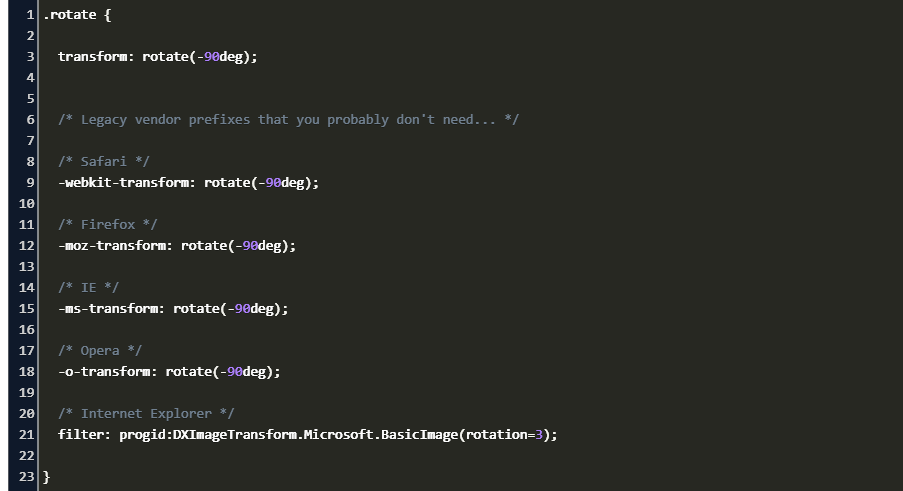
Just to let you know you, can rotate any element in the Html, So on to how to do it first in the CSS target, the Element you want to Rotate, Next put in the transform property, and put Rotate like this.
There will be many types of rotates like rotateY rotateX rotateZ and rotate3d all of them can be put in the transform property.
RotateY is for up and down, rotateX is for Left also right and, rotateZ is for z-index.
So you can choose which one to use inside the rotate is next to the number of degrees you want to rotate, for example, 20deg is what you put in to turn is 20degs this works for all of them and, your code should look like this.
Hi, I’m Ajani and I want to share with you guys about my experience starting a gaming channel and streaming on twitch and youtube. Starting a youtube channel is not easy you have to do planing for videos stream games to play and much more special when you have a big following, I post Fortnite content on my gaming channel for people all over the world to see but before I starting posting PC stream and videos and I did it all on my phone. I didn’t have a way to play PC or PS4 games cus I had to save up for that stuff so I found a mobile game that people liked. I ended up growing I started with 5 subs the first week I started doing youtube, I was so hyped to see people starting to watch my content! so I posted every day and I ended up growing even more but it was one point where the views stoped and no-showed up so I started going to other small streamers and making friends with them I did calabs I was even in some of their videos and streams. After doing youtube for about a year I ended up with 36 subs and after that year I ended up with 78 and in 2020 I ended up with 100 subscribers!!!!, I ended up getting a ps4 and started playing games on my laptop and streaming them I watched videos on how to grow what games to make how to make artwork pop to bring more views in. So here I am now with 160 subscribers and still growing so doing youtube helps you meet new people and share what have learned together, So keep the grind up and remember <CodeHarder365>!!!!!
Hi, I’m Ajani and I want to share with you guys about my experience starting a gaming channel and streaming on twitch and youtube. Starting a youtube channel is not easy you have to do planing for videos stream games to play and much more special when you have a big following, I post Fortnite content on my gaming channel for people all over the world to see but before I starting posting PC stream and videos and I did it all on my phone. I didn’t have a way to play PC or PS4 games cus I had to save up for that stuff so I found a mobile game that people liked. I ended up growing I started with 5 subs the first week I started doing youtube, I was so hyped to see people starting to watch my content! so I posted every day and I ended up growing even more but it was one point where the views stoped and no-showed up so I started going to other small streamers and making friends with them I did calabs I was even in some of their videos and streams. After doing youtube for about a year I ended up with 36 subs and after that year I ended up with 78 and in 2020 I ended up with 100 subscribers!!!!, I ended up getting a ps4 and started playing games on my laptop and streaming them I watched videos on how to grow what games to make how to make artwork pop to bring more views in. So here I am now with 160 subscribers and still growing so doing youtube helps you meet new people and share what have learned together, So keep the grind up and remember <CodeHarder365>!!!!!
Hi, my name is Ajani and I have once again another trick for you to try if your phone is slow. Now, this trick only works for android phones but I will update this if I find a way to do it on iPhones. So if you run out of memory and you have deleted all your apps and Photos, But can seem to find what’s running all your space out, Well it’s cause the photos and apps that were deleted are still on your phone. Big pieces of data are still on your phone from your apps and photos but it’s a way to get rid of them, So you first want to go to your setting and go to your gallery and clear data and cache after that is done you should have a lot of space left. Now for the apps what u want to do is download a deep clear it will clear all the hidden data. And that is pretty much it just make should clear your phone once in and while and you should be good.
Sup guys, it’s Hasani, and today, I will show you how to make a hover animation using Html and CSS.
Ok, so first I will show you a hover animation, In your Html, you have to make a button tag, give it a class and go to your CSS.
In the CSS target, make a class for the button then, put what you want on is then make another target for the button, and put :hover.
What this means is, anything in the target of the button will happen when the mouse cursor is on top of the element, with this you can make backgrounds, colors, anything that changes with hover.
Hi, Ajani here and ill be telling you guys about how to start using azure for free today.
(Please note this only works if you have a student email for school)
so first go and google Azure for students or click the link press start today.
Put in all of your school email info once done it should ask you for a phone number to verify that your, not a bot once done and signed up you will start with 100 credits make sure you keep track on how much you’re using.
That’s all for now I hope this helped and remember <CodeHarder365>
Hi Ajani here and I want to share a trick I learned to clean your pc or laptop and make it run faster.
So first you guys want to go to your search bar on your laptop or pc and type in run, Once done type in %Temp% and enter.
Once that is done Deleted all of the files in there if I error comes up saying an app is using the file skip and press the checkmark for it to do for all if some files are still in that folder then keep them in there cause they help with apps for your pc – laptop.
Once done open a new run tab and type recent and get rid of all of the files in there once that is done open one last run tab and type tree that will clean all the windows and apps once that’s done you will se a change in response speed and app time for opening them.





 Brothers Who Code