
The beginner learning to code should focus on the basics fundamentals of HTML and CSS. It would help to be computer literate before taking a deep dive into learning code. There are many concepts to learn during your journey. Research, Using The Command Prompt, Learning The File Derrectere, Installing Tools, Bootstrap, Sass, CSS Grid, Flexbox, GSAP, CSS Reset, Learning these tools will add in the learning process.
Research is a must: Let’s say that there is a problem in the code that you are, writing and you can figure it out. Don’t panic! You will need to do some research on your browser what your problem is. Websites to visit when you’re problem-solving. Stackoverflow.com, W3Schools.com, Css-tricks.com, Developer.mozilla.org all these websites show you documentation that you will need to fix the problem. Next, to keep your browser running smoothly, Updates are required so your browser does not get its data to stuck and run slow so, make sure to update the browser every time it asks to be updated. If you research it will make HTML and CSS easier and help in the long run.

Command Prompt, Command prompt is a command-line interpreter application available in most Windows operating systems. It’s used to execute entered commands and can be used to locate files/folders and edit. NPM is a tool used to install the command prompt faster by using tools like Git and Sudo. Now I will talk about Git which, is software for tracking changes in any set of files, usually used for adjusting work its collaboratively developing source code during software development.

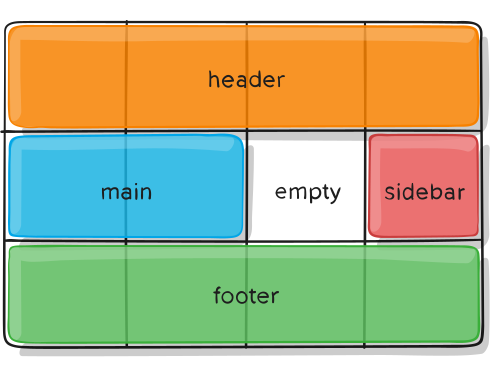
CSS Grid is a two-dimensional grid system used to work on the layout of UI elements and segments of a webpage. The Grid comprises horizontal and vertical lines to form rows and columns. Using CSS Grid to place UI elements helps to position them precisely which is beneficial for implementing responsive design for the site. The Grid uses pixels to fix the sizes of elements, and these too can be flexible on a percentage basis. This helps the same webpage adjust its design according to the screen size of different devices like phones, tablets, and desktops. CSS Grid thus plays an important role in creating web page layouts that facilitate responsiveness. It is a key tool in building cross-platform compatible software by facilitating the creation of an attractive UI.
GSAP, Simply put, GSAP is an animation framework that uses javascript to make animations to put in elements in the HTML document. There are many ways to use animations on websites like moving images and text. GSAP can also be used as a suite of tools for scripted animation. It includes The GSAP core, The core of the engine which animates any property of any object. The core makes animation easy and it takes only a few lines of code to give you more control over your animations.
Bootstrap: Bootstrap is a free and open-source front-end development framework for the creation of websites and web apps. Bootstrap is very useful because It allows you to design templates for forms, buttons, tables, navigation, modals, image carousels, etc. It also gives you support for JavaScript plugins. Bootstrap can also be used as a potent front-end framework used to create modern websites and web apps. It’s open-source and free to use yet features make it easy to use HTML and CSS templates for UI interface elements such as buttons and forms. Another great thing about Bootstrap is it’s great for quickly throwing together a prototype or internal tool, but it is not intended, for use on a production website Bootstrap’s way of doing things means fast development, but it makes zero sense for a uniquely designed website.
Sass: Sass is an extension of CSS that enables you to use things like variables, inline imports, and more. It also helps to keep things organized and allows you to create style sheets faster. Sass is compatible with all versions of CSS. Just like other programming languages, Sass allows the use of variables that can store the information you can use throughout your style sheet. For example, you can store a color value in a variable at the top of the file, and then use this variable when setting the color of your elements. This enables you to quickly change your colors without having to modify each line separately. Used with Partials the @import directive allows you to import your partial files into the current file, to build one single CSS file. Be mindful of how many imports you’re using as an HTTP request will be generated, for each one.

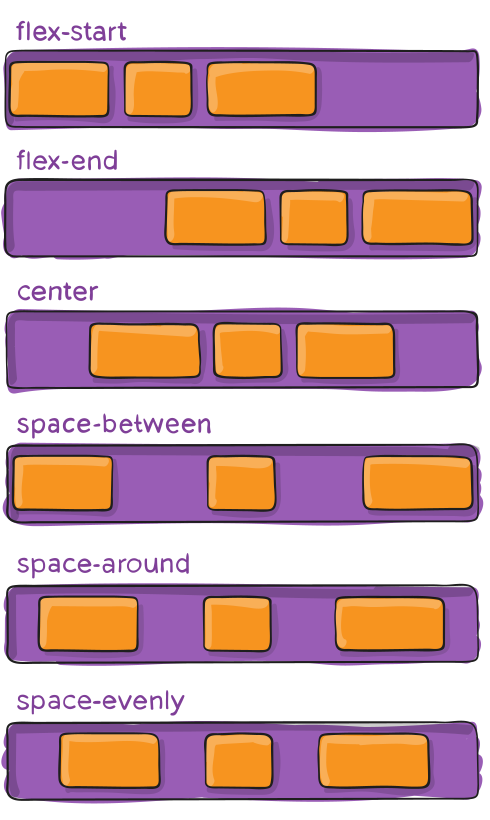
Flexbox: Flexbox is a layout model that allows elements to align and distribute space within a container. Using flexible widths and heights, elements can be aligned to fill a space or distribute space between elements, which makes it a great tool to use for responsive design. Flexbox is inherently good at dynamically sizing elements. When using display: flex; on a parent element Aka the container element like a section or div makes it so that the child elements which are a tag, p tag, and image tags orderly queue with matching heights. Matching heights vertically used can be somewhat difficult and would require more time in the CSS file. Now using flexbox handles the vertical height by default. It’s one of my favorite features of flexbox because I love orderly grids. The align-items property in flexbox defaults to stretch.
CSS Reset: CSS Reset is a short, often compressed set of CSS rules that reset the styling of all HTML elements to a consistent baseline. Every browser has its own default user agent stylesheet, that it uses to make unstyled websites appear more clear. For example, most browsers by default make links blue and click on links purple, give tables a certain amount of border and padding, apply variable font sizes to H1, H2, H3, and a certain amount of padding to almost everything. Ever wondered why do the Submit buttons look different in every browser well it’s because different browsers have different core systems that change the way each browser displays the HTML document but, you can fix this by using a CSS Reset, which can force every browser to have all its styles reset to the default, thus avoiding cross-browser differences as much as possible. Different browsers apply different default styling to elements, so if you are looking to have your website look the same in all the different browsers, a CSS reset is important. it allows you to think forwards as far as applying attributes like margin and padding to page elements in the CSS of your document.
Once you have practiced these key concepts and fundamentals and you are confident in your skills. The next step is to choose a new language to learn like Javascript, C#, C++, PHP.
 Brothers Who Code